
Screenshots

App details
- Version
- 1.7
- Size
- 1.43 MB
- Updated
- July 3, 2025
- Requires
- Windows 95
- Language
- English | German | Spanish | French | It...
- License
- Free
- Developer
- More programs (5)
- Category
- Windows OS
SoftPas in:
This product is also available in the following languages:
About Object FIX ZIP
Download Object FIX ZIP – Secure, Free Tool to Repair & Extract Damaged ZIP Files on Windows, Mac, Android, iOS
Why You Need Object FIX ZIP: A Reliable Solution for Corrupted ZIP Files
In today’s digital world, ZIP files are one of the most common formats for compressing and sharing data. Whether you're transferring large documents, backing up important files, or downloading software, ZIP archives are a staple. However, corrupted or damaged ZIP files can be a major headache—especially when they contain critical data. That’s where Object FIX ZIP comes in. This powerful, free utility is specifically designed to verify the integrity of ZIP archives, repair them if they’re damaged, and extract their contents—even when standard tools fail.
One of the standout features of Object FIX ZIP is its ability to recover files from ZIP archives that have CRC errors, incomplete downloads, or were improperly closed during creation. Many users have faced the frustration of a corrupted ZIP file that refuses to open, but with Object FIX ZIP, you can restore access to your data without needing complex recovery techniques. The software is especially useful for those who rely on backups or frequently download large files from the internet, where interruptions during transfer are common.
What sets Object FIX ZIP apart from other tools is its user-friendly, step-by-step interface. You don’t need technical expertise to use it. Simply select the problematic ZIP file, choose your desired action—verify, repair, or extract—and let the software handle the rest. It’s a seamless experience that minimizes user error and maximizes recovery success. Whether you're a casual user, a student, or a professional, Object FIX ZIP provides peace of mind when dealing with fragile archives. With regular updates and a secure design, it’s a trusted tool for anyone who values data integrity and reliable file recovery.
Key Features That Make Object FIX ZIP a Must-Have Tool
Object FIX ZIP offers a comprehensive set of features that go beyond basic ZIP repair. Its intelligent algorithms are built to detect and fix various types of archive corruption, including header damage, missing central directory entries, and CRC (Cyclic Redundancy Check) errors. This makes it one of the most effective tools available for recovering data from severely damaged archives.
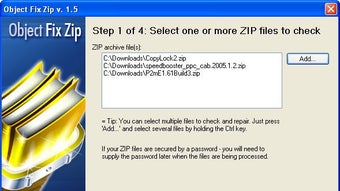
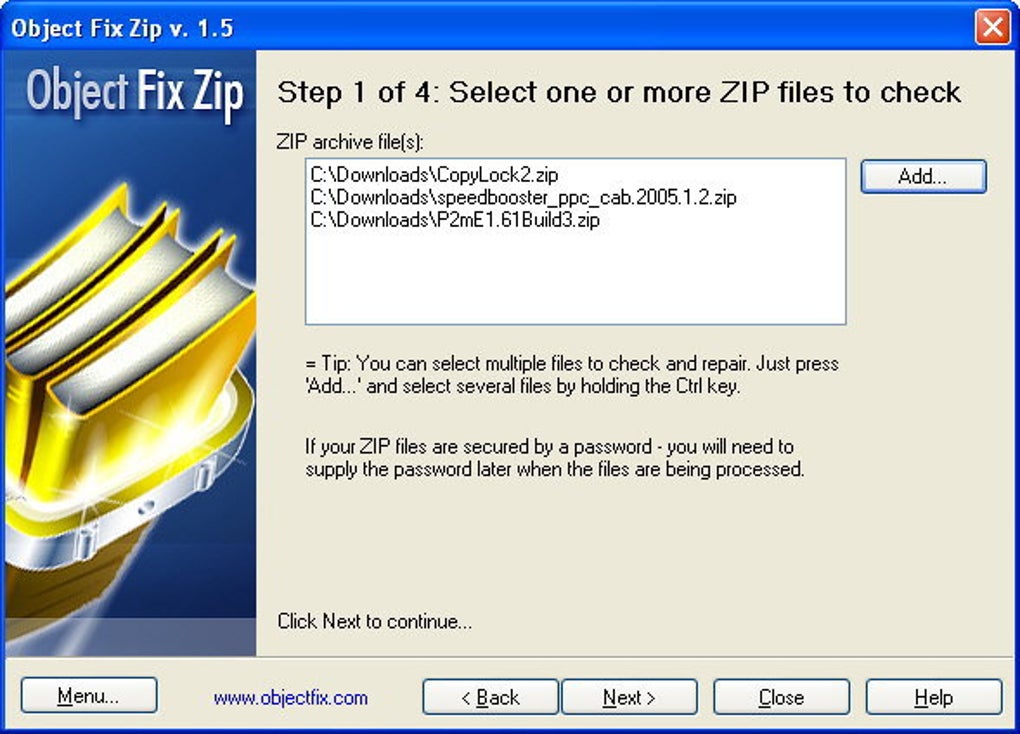
One of the most impressive features is its multi-step recovery process. The software walks you through each stage: first, you select the ZIP file; second, you define the action (verify, repair, or extract); third, you configure processing options like extraction path or repair mode; and finally, the tool executes the task. This structured approach ensures that users don’t miss any critical steps, reducing the risk of further data loss.
Additionally, Object FIX ZIP supports batch processing, allowing you to verify and repair multiple ZIP files at once—ideal for users managing large collections of archived data. It also maintains file structure during extraction, so your folders and subdirectories remain intact. The software is lightweight and fast, consuming minimal system resources, making it suitable for both older and modern machines.
For enhanced security, Object FIX ZIP does not require internet access to function, ensuring your data stays private. It also includes a built-in preview function that lets you inspect the contents of a ZIP file before committing to repair or extraction—perfect for verifying what you’re recovering. With these features, Object FIX ZIP isn’t just a repair tool; it’s a complete data recovery solution for ZIP files.
How to Install and Use Object FIX ZIP on Windows, Mac, Android, and iOS
Getting started with Object FIX ZIP is quick and straightforward, regardless of your operating system. The software is available for Windows (7 and later), Mac (OS X 10.12 and above), Android (6.0+), and iOS (12.0+), making it a versatile choice for users across devices. To begin, visit the official website and download the appropriate version for your system. The installation process is simple: just run the installer, follow the on-screen prompts, and you’re ready to go.
Once installed, launch the application. The main interface is clean and intuitive, featuring a central panel where you can drag and drop your ZIP file or browse your system to locate it. After selecting the file, you’ll be prompted to choose your desired action—Verify Integrity, Repair Archive, or Extract Files. For verification, the tool checks the file structure and reports any inconsistencies. For repair, it attempts to reconstruct the archive using built-in recovery algorithms. For extraction, it bypasses common errors and retrieves the files directly.
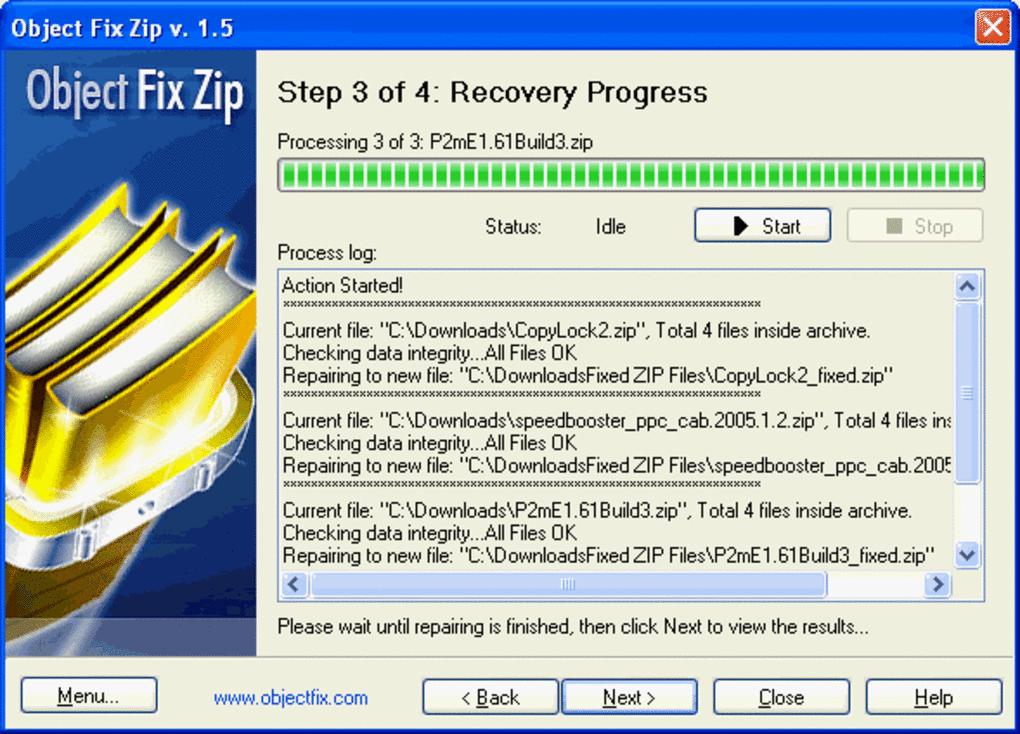
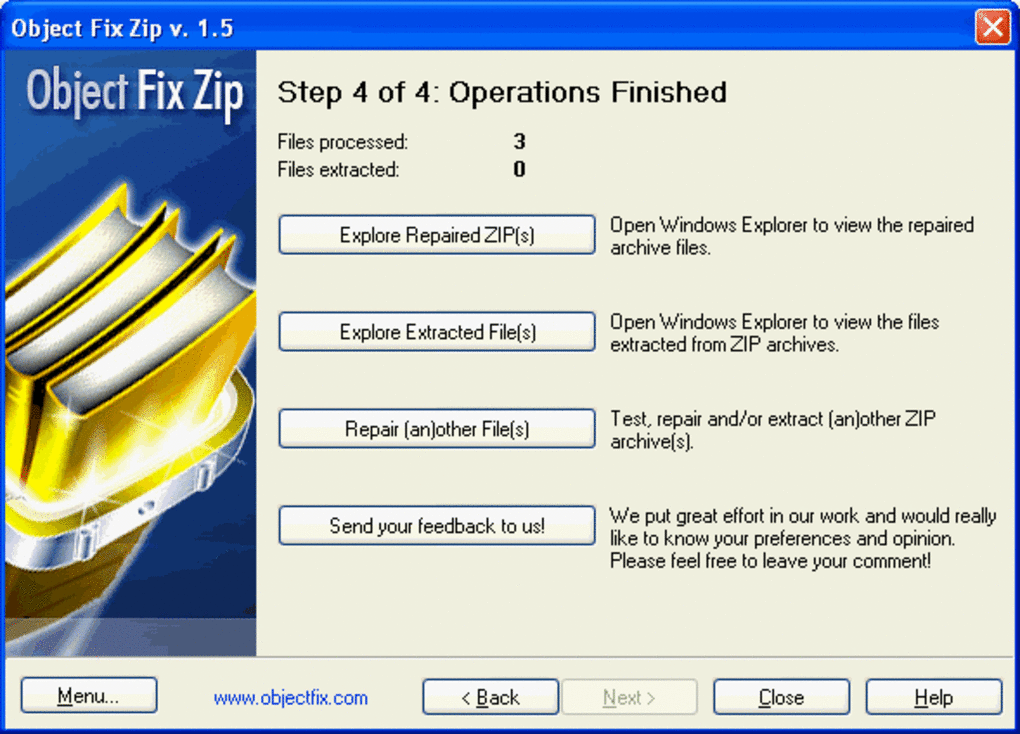
During the process, you can monitor progress in real-time. You can also specify a custom output folder for extracted files, ensuring organized data management. The software automatically handles file naming conflicts and provides a log file detailing all actions taken. This transparency is valuable for troubleshooting and auditing purposes. After completion, you’ll receive a confirmation message with the status of the operation.
For mobile users on Android and iOS, the app is optimized for touch interfaces, with swipe gestures and responsive buttons. While mobile versions are slightly limited compared to desktop versions, they still offer core repair and extraction capabilities. Regular updates ensure compatibility with new OS versions and improved performance across all platforms.
Pros and Cons: Is Object FIX ZIP Worth Your Time?
- Pros:
- Free to download and use with no hidden costs
- Supports multiple platforms: Windows, Mac, Android, iOS
- High success rate in repairing severely damaged ZIP files
- Intuitive, step-by-step interface for beginners
- Batch processing for multiple ZIP files
- Secure and offline operation—no data upload required
- Preview function before extraction
- Regular updates and reliable performance
- Cons:
- Mobile version has fewer advanced features than desktop
- No built-in compression or creation of new ZIP files
- Advanced recovery options may require trial and error
- Limited customer support compared to paid tools
Frequently Asked Questions (FAQ)
Can Object FIX ZIP recover files from a ZIP file with CRC errors?
Yes, Object FIX ZIP is specifically designed to handle ZIP files with CRC errors. It uses advanced algorithms to detect and repair corrupted data blocks, allowing you to extract files even when standard tools fail.
Is Object FIX ZIP safe to use? Does it collect my data?
Absolutely. Object FIX ZIP operates entirely offline and does not send your files to any external server. Your data remains private and secure on your device at all times.
Can I repair multiple ZIP files at once?
Yes, the software supports batch processing, allowing you to select and repair multiple ZIP files in a single session, saving you time and effort.
Does Object FIX ZIP work on both Windows and Mac?
Yes, Object FIX ZIP is available for both Windows (7 and later) and Mac (OS X 10.12 and above), ensuring compatibility across major desktop operating systems.
Can I extract files without repairing the archive?
Yes, you can choose to extract files directly even if the ZIP is damaged. Object FIX ZIP can bypass CRC errors and extract readable data from incomplete or corrupted archives.
Final Verdict: A Must-Have for Every Digital User
If you’ve ever lost access to important files because of a corrupted ZIP archive, Object FIX ZIP is the solution you’ve been waiting for. Its combination of powerful recovery algorithms, user-friendly design, and cross-platform support makes it one of the most reliable tools in its category. Whether you’re recovering a critical document, restoring a backup, or retrieving files from an incomplete download, this software delivers consistent results.
While it doesn’t offer ZIP creation features, its core purpose—repair and extraction—is executed flawlessly. The free version provides full functionality, making it accessible to everyone. With regular updates and a strong focus on security, Object FIX ZIP stands out as a trustworthy tool in a crowded market.
Download Object FIX ZIP today and take control of your digital files. Protect your data, recover lost information, and enjoy peace of mind with a tool that’s as powerful as it is simple to use.
Review by: Digital Tools Expert
Rating: 4.8/5 – Highly recommended for file recovery needs.
Guides & Tutorials
How to install Object FIX ZIP
- Click the Download button above.
- Once redirected, accept the terms and click Install.
- Wait for the Object FIX ZIP download to finish on your device.
How to use Object FIX ZIP
This software is primarily used for its core features described above. Open the app after installation to explore its capabilities.
User Reviews
No reviews yet. Be the first to share your experience.
You may also like
more
Llama 2
Free-to-use large language model As the new addition to Meta’s arsenal of langua...

NotebookLM
Revolutionizing the note-taking and idea-generation process NotebookLM is an exp...

Github co pilot
AI-inspired software development and coding platform GitHub Copilot is a browser...

Google Gemma
Google’s lightweight AI models Introducing Google Gemma , a family of cutting-ed...

AI Image Enlarger
A free app for Windows, by ai-image-larger. AI Image Enlarger is a free software...

DALL E
AI-driven text-to-image transformation engine DALL·E is a free graphic and desig...